Build a LanceDB Memory Plugin for OpenClaw
OpenClaw's built-in memory forgets too much. Build a custom LanceDB plugin with hybrid retrieval, multi-scope isolation, and noise filtering.
 Chen-Hung Wu•Feb 28, 2026
I spent an hour walking my OpenClaw agent through a gnarly deployment setup — VPN tunnels, non-standard ports, a race condition in auth/middleware.ts that only surfaces under load. Next session, gone. The agent had no idea any of that happened.
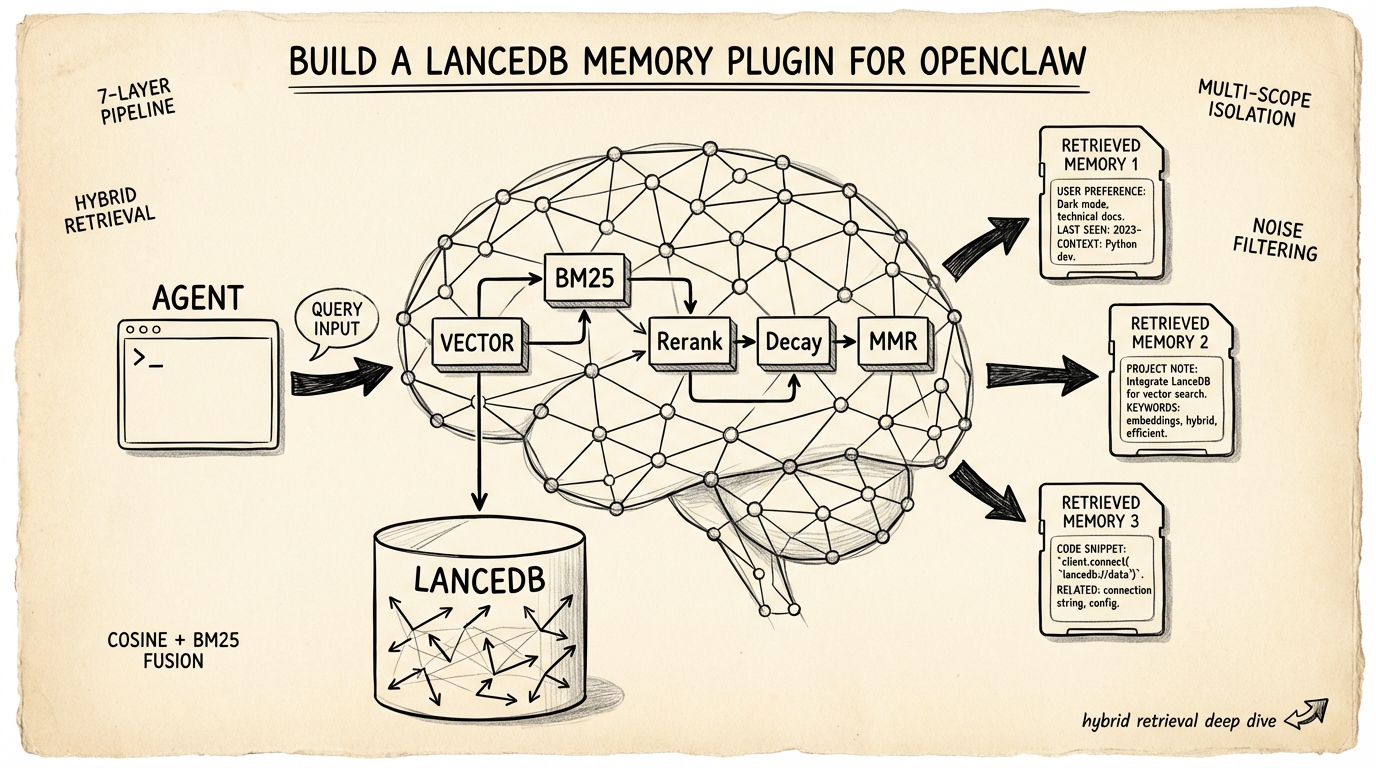
OpenClaw persists memory as Markdown files. That works until it doesn't. The model decides what's worth saving, which means it routinely drops details you know are critical but it doesn't recognize as important. A community plugin called memory-lancedb-pro replaces that subsystem entirely — swapping flat files for a vector database with hybrid retrieval, scoped access control, and automatic noise rejection. I've been running it in my daily workflow. This article breaks down the engineering inside it, what the code actually does (I read it), and where the design makes real trade-offs.
Where OpenClaw's Memory Breaks Down
OpenClaw's default memory system stores facts in two places: MEMORY.md for curated long-term knowledge, and memory/YYYY-MM-DD.md for daily session logs. Both are plain Markdown. Under the hood, the built-in memory plugin indexes these files into a per-agent SQLite database (~400-token chunks with 80-token overlap) and supports search via memory_search — which does include both vector similarity and BM25 keyword matching.
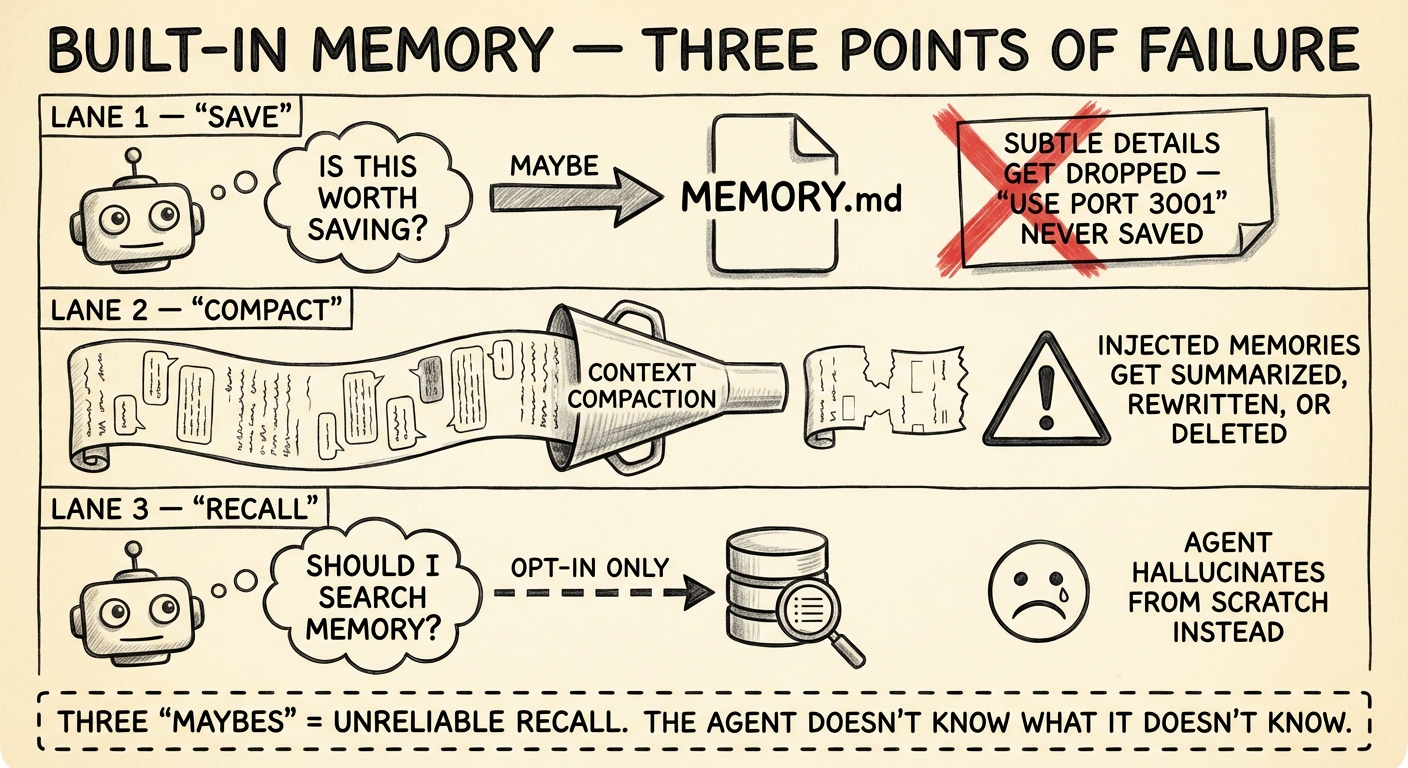
So the retrieval engine isn't the problem. The problem is everything around it.
The agent controls what gets persisted. Memory capture is LLM-driven. The model decides what's worth writing to MEMORY.md. In practice, it consistently misses the subtle stuff — a port number mentioned in passing, a workaround you described once, an env var name. These details matter. The model doesn't know they matter.
Context compaction erodes injected memories. When the conversation approaches the context window limit, OpenClaw compresses older messages. The memory files on disk survive — but any previously retrieved context that was injected into the conversation gets summarized or dropped during compaction. The next time the agent needs that fact, it has to re-retrieve it, assuming it knows to look. There's a memoryFlush mechanism that can trigger writes before compaction kicks in, but it's not a complete solution.
Recall is opt-in. The memory_search tool only fires when the agent decides to call it. No automatic retrieval means relevant facts sit in the index while the agent confidently works from an incomplete picture. You can mitigate this with system prompts that instruct the agent to search memory more aggressively, but you're still relying on the model to follow instructions consistently.
These aren't bugs. They're architectural choices that optimize for simplicity and low resource usage. For single-agent setups where occasional gaps are tolerable, the built-in system is fine. But when you need reliable cross-session recall — when you're running multi-agent pipelines, or when your agent handles infrastructure where a forgotten credential path means a 3am page — you need something more structured.
Why LanceDB for Agent Memory
Before diving into the retrieval pipeline, it's worth asking: why LanceDB specifically?
LanceDB is an embedded, serverless vector database built on the Lance columnar format (Apache Arrow-based). It runs in-process — no separate server, no Docker container, no managed service. Think SQLite for vectors. It memory-maps files from disk with SIMD-optimized queries, handles 200M+ vectors, and supports both ANN (approximate nearest neighbor) vector search and BM25 full-text search natively.
For agent memory, that embedded architecture is a near-perfect fit. Agent memory databases are small — thousands to tens of thousands of entries. You don't need Qdrant's distributed clustering or Pinecone's managed infrastructure. You need something that starts instantly, requires zero ops, and lives alongside your agent process. LanceDB does exactly that, with the bonus that its native hybrid search means you don't need to bolt on a separate full-text engine.
The main limitation: LanceDB's full-text search doesn't support boolean operators (AND, OR) in queries, and the ecosystem is younger than alternatives like Qdrant or Chroma. For agent memory workloads, neither of these matters much.
The Hybrid Retrieval Pipeline
Pure vector search handles semantic similarity well — it knows "the machine running the gateway" and "gateway host" mean the same thing. But it fails on exact matches. Error codes, IP addresses, function names, config keys — these don't have meaningful semantic neighbors. They need keyword matching.
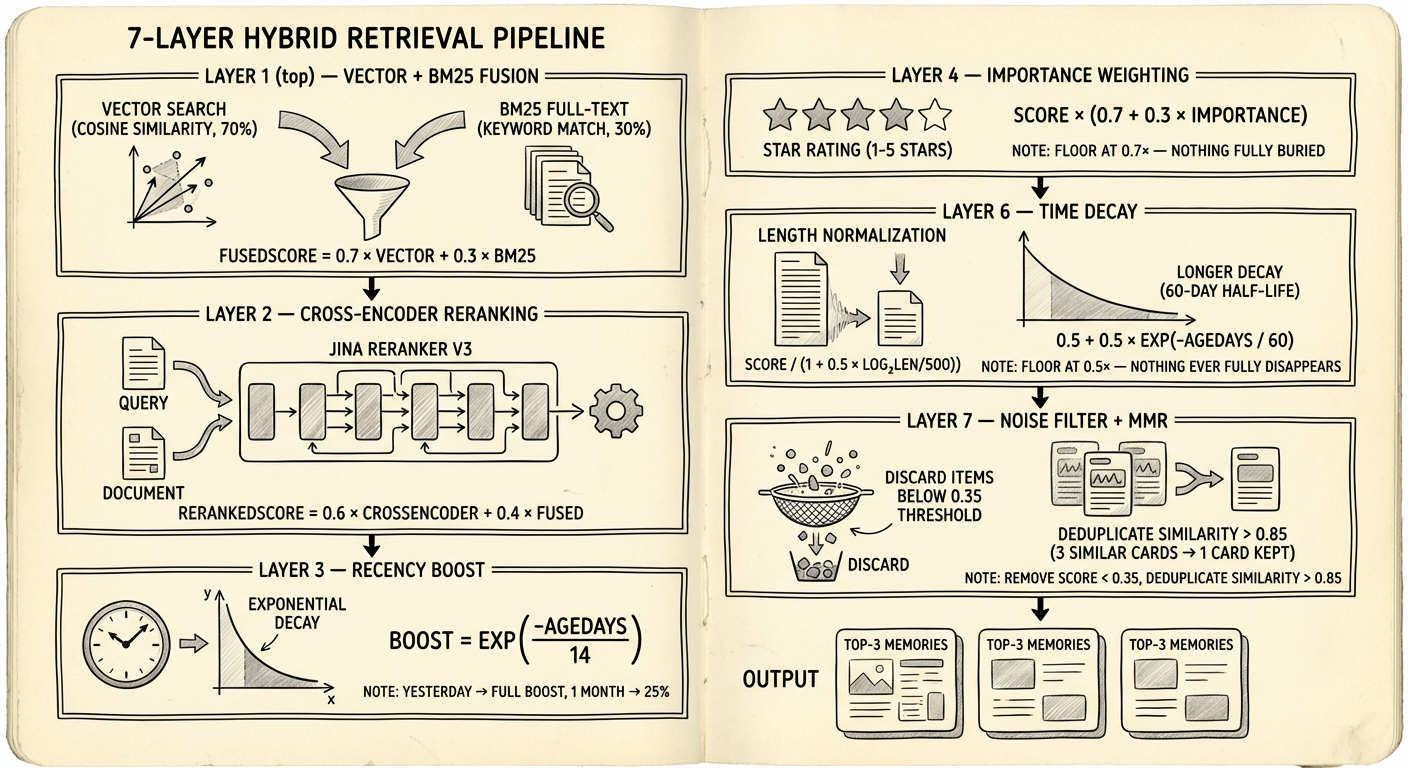
The memory-lancedb-pro plugin runs a multi-stage retrieval pipeline that fuses vector and keyword signals, then applies a series of post-processing passes to suppress noise and stale results. Here's what the code actually does.
Stage 1: Vector + BM25 Fusion
Every query runs vector search (cosine similarity via LanceDB ANN) and BM25 full-text search in parallel via Promise.all(). The fusion is not the traditional weighted sum you see in most RAG tutorials. Reading the actual retriever.ts, the plugin uses a multiplicative BM25 boost on the vector score:
fusedScore = vectorScore + (bm25Hit ? 0.15 × vectorScore : 0)
If a result appears in both the vector and BM25 results, it gets a 15% score bump. If it only appears in BM25 (no vector match), the raw BM25 score is used directly. This is a departure from the classic α × vector + (1-α) × bm25 formula — the plugin's README describes it as "tuned beyond traditional RRF" for their specific use case.
Worth noting: the config exposes vectorWeight and bm25Weight parameters (defaulting to 0.7/0.3), but these aren't used in the fusion calculation. They exist in the schema, not in the hot path. If you're tuning retrieval quality, adjusting them won't change results — you'd need to modify the fusion logic itself.
Stage 2: Cross-Encoder Reranking
Bi-encoders (the models that generate your embeddings) encode query and document separately. Fast, but they can't capture token-level interactions between the query and a specific passage. Cross-encoders process both together through a full transformer pass — slower, but significantly more accurate at judging relevance.
The plugin sends top candidates to a cross-encoder API (Jina Reranker v3 by default, with support for Voyage, SiliconFlow, and Pinecone rerankers) and blends scores:
rerankedScore = 0.6 × crossEncoderScore + 0.4 × fusedScore
The 40% anchor to the original fused score is a safeguard. Cross-encoders occasionally assign high relevance to tangentially related content. Blending prevents a single reranker hallucination from dominating the final ranking. If the reranker API fails or times out (5-second limit), the plugin falls back to cosine similarity reranking — degraded but not broken.
Stage 3–6: Score Adjustments
Four multiplicative passes adjust the reranked scores:
| Stage | Formula | Purpose |
|---|---|---|
| Recency boost | exp(-ageDays / 14) × 0.10 | Additive boost favoring recent memories. 14-day half-life. |
| Importance | score × (0.7 + 0.3 × importance) | Importance is a 0–1 float set at storage time. Floor of 0.7× ensures low-importance entries aren't buried. |
| Length norm | score / (1 + 0.5 × log₂(max(len/500, 1))) | Penalizes verbose entries that match more terms by accident. Short entries (under 500 chars) are unaffected. |
| Time decay | score × (0.5 + 0.5 × exp(-ageDays / 60)) | Long-term forgetting curve. 60-day half-life, 0.5× floor — nothing fully disappears. |
The recency boost and time decay look similar but serve different functions. Recency is a short-term nudge (14-day half-life, small additive weight) that surfaces yesterday's debug session over last month's. Time decay is a long-term signal (60-day half-life, multiplicative) that gradually deprioritizes memories that haven't been recalled in months. Using both lets the system be aggressive about freshness in the short term without permanently burying older knowledge.
Stage 7: Noise Floor + Diversity Filter
Two final passes. First, anything scoring below 0.35 is discarded — a hard noise floor that prevents marginally relevant results from consuming limited context slots.
Then a diversity filter (inspired by Maximal Marginal Relevance) removes near-duplicates. If two results have cosine similarity > 0.85, the lower-scoring one gets demoted. This isn't the classic iterative lambda-weighted MMR algorithm — it's a simpler threshold check. But for agent memory, where you might have ten slightly different versions of the same daily note, it's effective. The goal is preventing your top-3 results from being three paraphrases of the same fact.
// Diversity filter (MMR-inspired)
for (const candidate of sorted) {
  const tooSimilar = selected.some(
    s => cosineSim(s.embedding, candidate.embedding) > 0.85
  );
  if (!tooSimilar) selected.push(candidate);
}
Multi-Scope Isolation
In multi-agent setups, you need boundaries. Your code review agent shouldn't read your DevOps agent's infrastructure credentials. But you also don't want total isolation — coding standards and team conventions should be universally accessible.
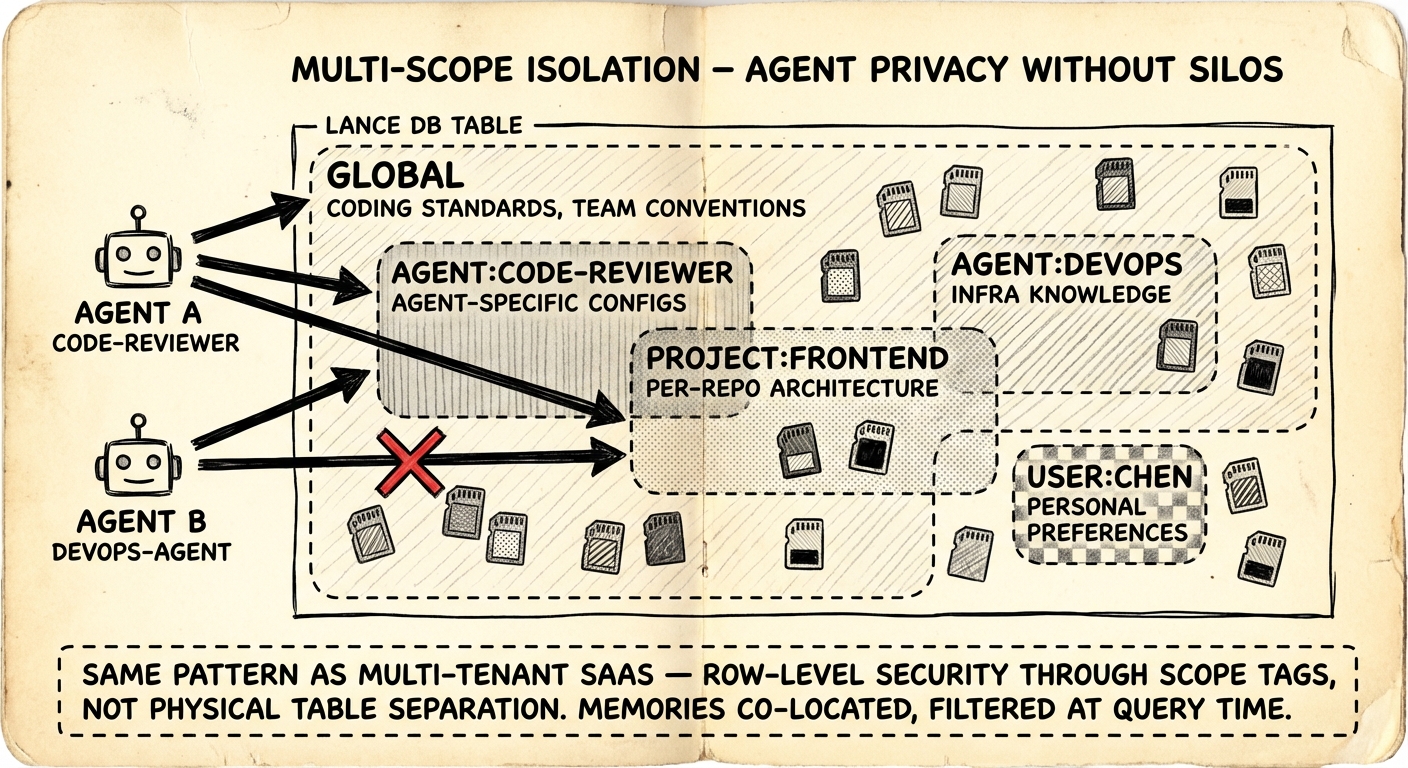
The plugin tags every memory with a scope and filters at query time. Five scope types:
| Scope | Visibility | Example |
|---|---|---|
global | All agents | Coding standards, team conventions |
agent:<id> | Single agent | Agent-specific config, learned preferences |
project:<id> | Project boundary | Per-repo architecture decisions |
user:<id> | User-specific | Personal workflow preferences |
custom:<name> | Arbitrary | custom:debugging-tips, custom:oncall-runbook |
Each agent sees global plus its own agent:<id> scope by default. You expand access through configuration:
{
  "scopes": {
    "default": "global",
    "agentAccess": {
      "code-reviewer": ["global", "agent:code-reviewer", "project:frontend"],
      "devops-agent": ["global", "agent:devops-agent", "project:infra"]
    }
  }
}
This is row-level security via tagging on a shared index — the same pattern every multi-tenant SaaS database uses. All memories live in a single LanceDB table. No physical separation, no separate databases per agent. Query-time filtering handles access control. The trade-off is a minor query overhead from the scope filter, but for agent memory volumes (hundreds to thousands of entries) it's negligible.
The alternative — a separate vector store per agent — prevents knowledge sharing entirely and creates operational overhead that scales linearly with agent count. Tag-based filtering on a shared index is the right call here.
Noise Filtering and Adaptive Retrieval
The hardest part of agent memory isn't storage or retrieval. It's deciding what not to store and when not to search.
What Gets Rejected
The auto-capture system applies regex-based filtering to reject content that would poison retrieval:
- Agent refusals: "I don't have information about that" — storing these means future queries about missing knowledge match the refusal instead of finding the actual answer
- Meta-questions: "Do you remember what we discussed?" — meta-queries about memory shouldn't become memories themselves
- Keepalives and greetings: "HEARTBEAT", "Hi", "Hello" — these match against every future greeting and waste context injection slots
- Confirmation noise: "OK", "Got it", "Thanks" — zero information content, high false-positive rate
When Search Gets Skipped
Not every user message needs a memory lookup. The adaptive retrieval system saves latency and avoids injecting irrelevant context:
- Short confirmations (under 15 chars English, 6 chars CJK) — skip
- Slash commands (
/help,/status) — skip - Single emoji — skip
- Messages containing memory-trigger keywords ("remember", "previously", "last time", "之前", "前回") — always search, regardless of length
function shouldRetrieve(query: string): boolean {
  if (MEMORY_KEYWORDS.some(k => query.includes(k))) return true;
  if (query.startsWith('/')) return false;
  const threshold = isCJK(query) ? 6 : 15;
  return query.length >= threshold;
}
The CJK-aware threshold is a small detail that matters. Chinese and Japanese pack far more meaning per character than English. A 6-character Chinese query like "之前的設定" ("previous config") is a legitimate recall request. Applying the English 15-character threshold would suppress it.
Try It Yourself
Prerequisites
- OpenClaw installed and running
- Node.js 18+
- An embedding API key (Jina AI has a free tier — jina.ai)
Step 1: Clone and Install
cd your-workspace/
git clone https://github.com/win4r/memory-lancedb-pro.git plugins/memory-lancedb-pro
cd plugins/memory-lancedb-pro
npm install
Step 2: Configure OpenClaw
Update openclaw.json:
{
  "plugins": {
    "slots": {
      "memory": "memory-lancedb-pro"
    },
    "memory-lancedb-pro": {
      "embedding": {
        "apiKey": "${JINA_API_KEY}",
        "model": "jina-embeddings-v5-text-small",
        "baseURL": "https://api.jina.ai/v1",
        "dimensions": 1024
      },
      "retrieval": {
        "mode": "hybrid",
        "rerank": "cross-encoder",
        "minScore": 0.3
      },
      "autoCapture": true,
      "autoRecall": true
    }
  }
}
Step 3: Set Your API Key and Restart
export JINA_API_KEY="jina_xxxxxxxxxxxxx"
openclaw gateway restart
openclaw plugins list
# Should show: memory-lancedb-pro (active)
Step 4: Verify
In a new session:
> Remember: our production database is at db-prod-east-2.example.com, port 5432
Start another session:
> What's our production database address?
The plugin should auto-recall the stored fact without you asking it to search.
Troubleshooting
- "memory unavailable" in status: Run
openclaw plugins doctor— usually a missing API key - Slow first query: LanceDB builds FTS indexes lazily on first search. Subsequent queries are fast.
- No auto-recall: Confirm
autoRecall: truein config, then restart the gateway
Embedding Provider Trade-offs
The plugin uses the OpenAI SDK with a configurable baseURL, so any OpenAI-compatible embedding API works. The choice comes down to latency, cost, and whether you can tolerate external API calls.
| Provider | Model | Dimensions | Notes |
|---|---|---|---|
| Jina | jina-embeddings-v5-text-small | 1024 | Free tier, ~50ms latency. Supports asymmetric task-aware embedding (taskQuery vs taskPassage). |
| OpenAI | text-embedding-3-small | 1536 | $0.02/1M tokens. Battle-tested, widest ecosystem support. |
| gemini-embedding-001 | 3072 | Free tier available. Highest dimensionality — overkill for conversational memory, potentially useful for code search. | |
| Ollama | nomic-embed-text | 768 | Fully local, zero API calls. Best for air-gapped or privacy-sensitive environments. |
For agent memory, 1024 dimensions is already generous. Conversational text has limited vocabulary compared to code search or academic papers. Higher dimensions capture more semantic nuance but cost more storage, more compute per query, and more memory. For a database of a few thousand agent memories, the cost difference is trivial — but the latency difference between a local Ollama model (~20ms) and a remote API call (~80ms) can add up when every user message triggers a retrieval.
Jina's task-aware embedding is worth mentioning. Most embedding tutorials encode queries and passages identically. Jina's taskQuery and taskPassage parameters optimize the embedding asymmetrically — the query embedding is tuned for recall, the passage embedding for precision. It's a measurable accuracy improvement that's easy to overlook.
Limitations and Honest Trade-offs
This plugin isn't free of compromises.
External API dependency for reranking. Cross-encoder reranking calls an external API on every retrieval. That's added latency (~200-500ms per query) and a failure point. The fallback to cosine similarity reranking is graceful, but you lose the accuracy boost. If you're running in an environment where external API calls are restricted, you'll need to disable reranking or host your own model.
No built-in embedding model. Unlike OpenClaw's built-in memory (which can auto-select from local embedding providers), this plugin requires you to configure an embedding provider explicitly. That's more control but more setup.
Memory capture is still LLM-driven. The plugin replaces retrieval and storage, but memory capture still depends on the agent deciding to save something. The autoCapture feature helps by intercepting messages at the system level, but the fundamental limitation — the model doesn't know what it doesn't know — remains.
Single-table design at scale. All memories across all scopes live in one LanceDB table with query-time scope filtering. For hundreds of agents with millions of memories, this could become a bottleneck. For the typical use case (a handful of agents, thousands of memories), it's perfectly fine.
Key Takeaways
OpenClaw's built-in memory is designed for simplicity — plain files, minimal infrastructure, good enough for casual use. The memory-lancedb-pro plugin is designed for reliability — structured retrieval, scoped isolation, automatic noise rejection. The gap between them is the gap between "the agent sometimes remembers" and "the agent consistently recalls what matters."
The retrieval pipeline is the most interesting part of the codebase. Each stage addresses a specific failure mode of naive vector search, and the design choices (multiplicative BM25 boost over traditional weighted fusion, dual time-decay curves, hard noise floor) reflect real experimentation rather than textbook formulas. If you're building any kind of RAG system, the source code is worth reading — particularly retriever.ts and noise-filter.ts.