Deep Dive: How Claude Code Remote Control Actually Works
Reverse-engineering the relay protocol, heartbeat, reconnection, and security model behind Claude Code /remote-control.
 Chen-Hung Wu•Feb 26, 2026
This Shouldn't Work
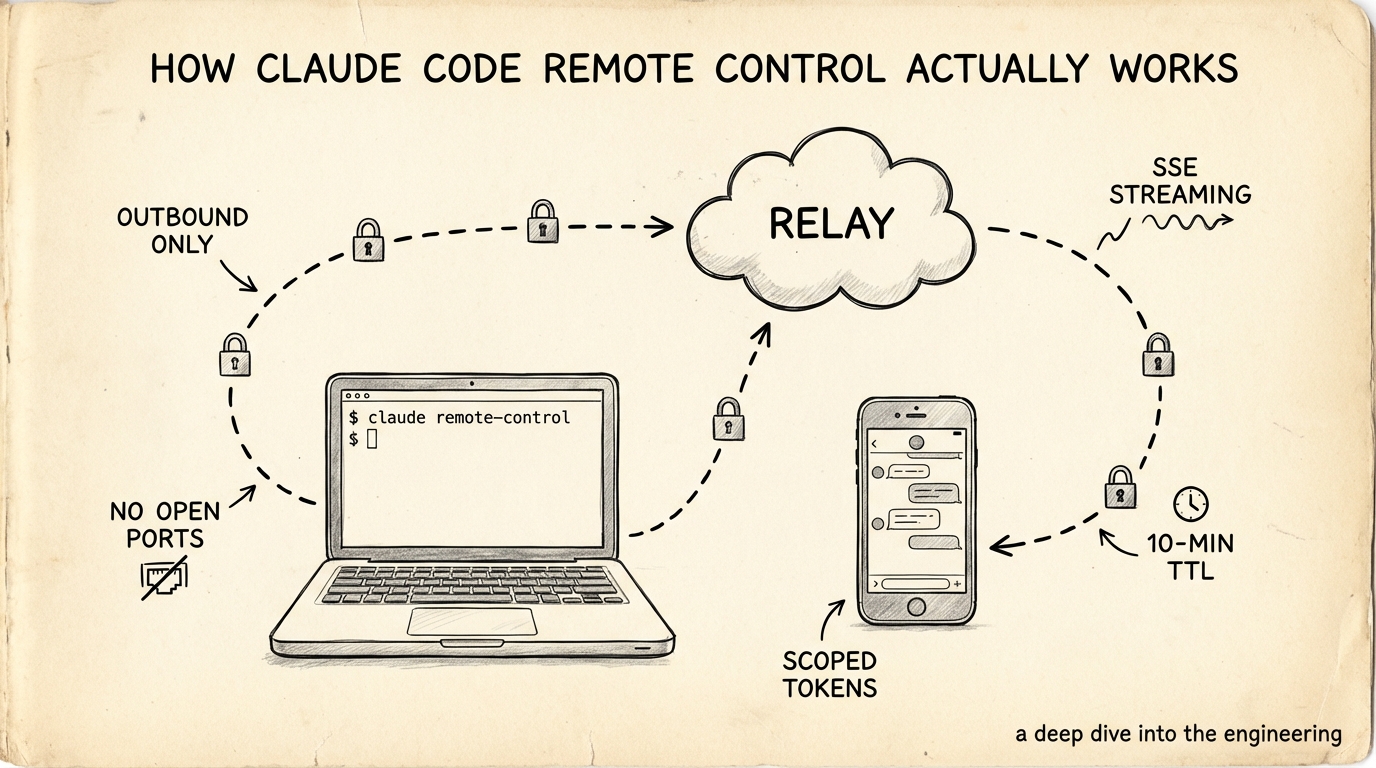
Two days ago Anthropic shipped a feature: start a Claude Code session on your laptop, pick it up on your phone. No SSH. No port forwarding. Scan a QR code and you're in.
My first reaction was "cool." My second was "wait — how?"
Your laptop sits behind NAT. Your phone is on LTE. No shared network, no VPN. Yet a command typed on your iPhone fires off git diff on a MacBook sitting on your desk at home.
I spent two days going through official docs, GitHub issues, bug reports, a third-party security audit, and Hacker News threads to take this thing apart. Here's what I found.
Connection Architecture
Zero Inbound Ports
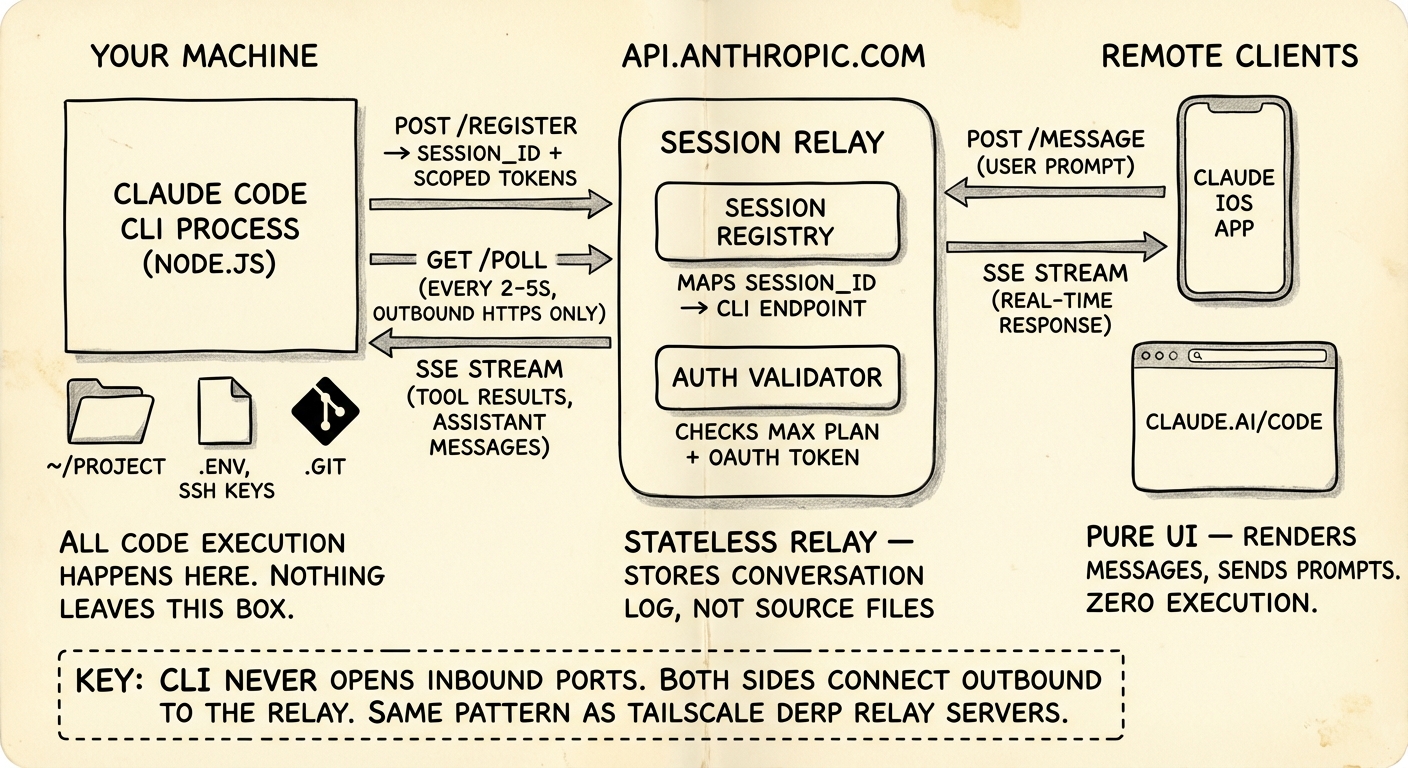
The whole design rests on one constraint: your machine never opens a listening port. Not one. The docs are blunt about it:
Your local Claude Code session makes outbound HTTPS requests only and never opens inbound ports on your machine.
If you've used Tailscale, you already know this trick. Tailscale's DERP relay servers work the same way — both endpoints connect outbound to a relay, and the relay stitches them together. Claude Code does the same thing, except it relays application messages instead of network packets.
The Relay Lives Inside the Anthropic API
Three actors:
Your machine — the Claude Code CLI process. Full access to your filesystem, SSH keys, .env, git repo. All code execution happens here and nowhere else.
api.anthropic.com — acts as message relay and session router. It forwards chat messages and tool results between endpoints. It does not store your source code. Only conversation messages pass through.
Phone / browser — claude.ai/code or the Claude mobile app. Pure UI. Renders conversations, sends prompts. No code runs here.
Protocol
Pieced together from documented behavior and bug reports:
- CLI → Anthropic: HTTPS polling. The CLI asks "got any new messages?" every few seconds.
- Anthropic → CLI: SSE (Server-Sent Events) streams back tool results and assistant messages — same mechanism the standard Claude API uses for streaming.
- Phone → Anthropic: Regular HTTPS + SSE, same as the
claude.aichat interface.
The relay is not a network tunnel. It doesn't forward TCP packets. It forwards structured application messages — chat prompts, tool execution results, status updates. Totally different from ngrok or VS Code Remote Tunnels, which forward raw network traffic.
This also means remote control can't expose arbitrary ports or services. It's confined to the Claude Code conversation model. That's not a limitation — it's a much smaller attack surface than a general-purpose tunnel.
Session Lifecycle
Most people start remote control from inside an existing session:
# Start remote control inside a running session
/remote-control

# Short form
/rc

# Or start a fresh session from the CLI directly
claude remote-control
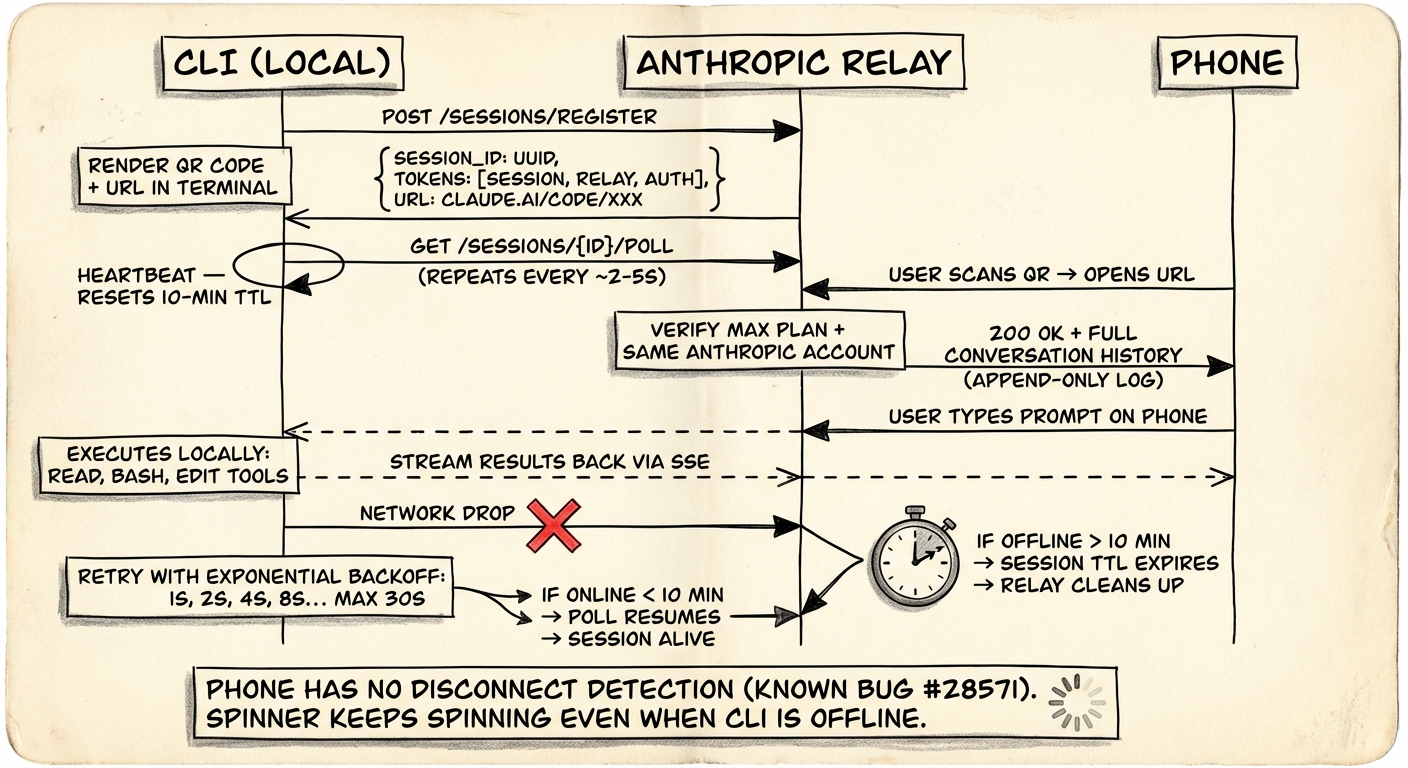
Step 1: Registration
The CLI sends an HTTPS POST to the Anthropic API to register a session. The API hands back:
- A session ID — UUID format
- A session URL — under
claude.ai/code, pointing to this specific session - Multiple short-lived credentials — each scoped to a single purpose
Step 2: QR Code
The terminal shows:
- A clickable session URL
- A QR code (toggle with spacebar)
No pairing protocol. No Bluetooth handshake. No device attestation. Scan the code, you're connected. This simplicity is both the best and worst thing about the design — more on that in the security section.
Step 3: Poll Loop
The CLI enters a loop:
while session_alive:
    response = HTTPS_GET("/sessions/{id}/poll", session_token)
    if response.has_new_message:
        execute_locally(response.message)
        stream_results_back()
    wait(poll_interval)   # roughly 2-5 seconds
The exact polling interval isn't documented. Based on how it feels in practice — remote commands land near-instantly, with occasional slight lag — I'd guess 2-5 seconds. Probably adaptive: shorter during active conversation, longer when idle.
Step 4: Phone Connects
After scanning the QR code:
- Claude app opens the session URL
- Anthropic checks that you're on a Max plan account
- The session appears in your session list with a green dot
- Full conversation history syncs to your phone
From here it's bidirectional. Type on your phone → relay → CLI executes locally → results stream back through relay → phone renders. Same flow from the terminal. Both sides stay in sync.
The Heartbeat Problem
This is where it gets interesting — and where the current implementation shows cracks.
The 10-Minute Hard Cutoff
If your machine loses network for roughly 10 minutes, the session dies. The CLI process exits. You have to run /rc again.
This points to a server-side session TTL. The relay keeps a timer per session. Each successful poll resets it. Miss the 10-minute mark and the relay declares the session dead and cleans up.
Sleep Survival
Close your laptop lid, the session lives — as long as the sleep doesn't exceed the timeout. When the machine wakes, the CLI resumes polling, the timer resets, and you're back. No special sleep-detection logic needed. The poll loop handles it naturally.
The Phone Has No Idea You're Offline
Here's the catch. When the CLI goes offline, the phone doesn't know.
From GitHub issue #28571:
"When the connection drops, there is no indication on the iOS app that the connection is lost. The session still appears 'Interactive' on iOS even after disconnection. Messages silently fail."
The spinner keeps spinning. The UI looks normal. You type a message, it looks like it sent, but it vanishes.
This tells us the heartbeat is one-way. The CLI polls the relay (proving it's alive), but the relay doesn't push health status to remote clients. The phone can't tell "the server is down" from "I just haven't heard back yet."
Textbook distributed systems problem.
How I'd Fix It
If I were designing this:
- Server side: the relay publishes a
last_seentimestamp per session, updated on every successful CLI poll - Client side: the phone subscribes to
last_seen. Ifnow - last_seen > 15s, show a yellow "connection may be unstable" warning. Past 60s, show red "connection lost" - Optimistic delivery: messages typed while disconnected queue client-side with a "pending" badge. Delivered when the CLI comes back. Time out after 10 minutes with "failed to deliver"
Same pattern as WhatsApp delivery status — one check mark means sent to server, two means delivered to device, blue means read.
Reconnection
Network drops, CLI doesn't give up immediately.
What We Know
- Sessions reconnect automatically when the machine comes back online
- Past ~10 minutes of sustained disconnection, the session times out
- After timeout you need to
/rcagain. The old conversation is accessible via--resume, but the remote link is gone
The Backoff Strategy
Almost certainly exponential backoff — it's the industry standard for HTTP polling retry, and the observed behavior fits:
retry_interval = min(1s * 2^attempt, 30s)
// 1s, 2s, 4s, 8s, 16s, 30s, 30s, 30s...
// ~20 attempts before the 10-min timeout
Phone-Side Reconnection Is Broken
The CLI reconnects fine. The phone doesn't. From GitHub issue #28402:
"Navigating away from the session on mobile loses the connection permanently. The original session URL doesn't reconnect — it opens a new unlinked thread."
Force-quit the app and reopen — you'll see stale conversation state, hours old. The only option is "New session," which loses all context.
This is a client-side state management bug. The app apparently doesn't persist the session binding locally, so after a restart it can't find its way back to the relay session.
Security Model
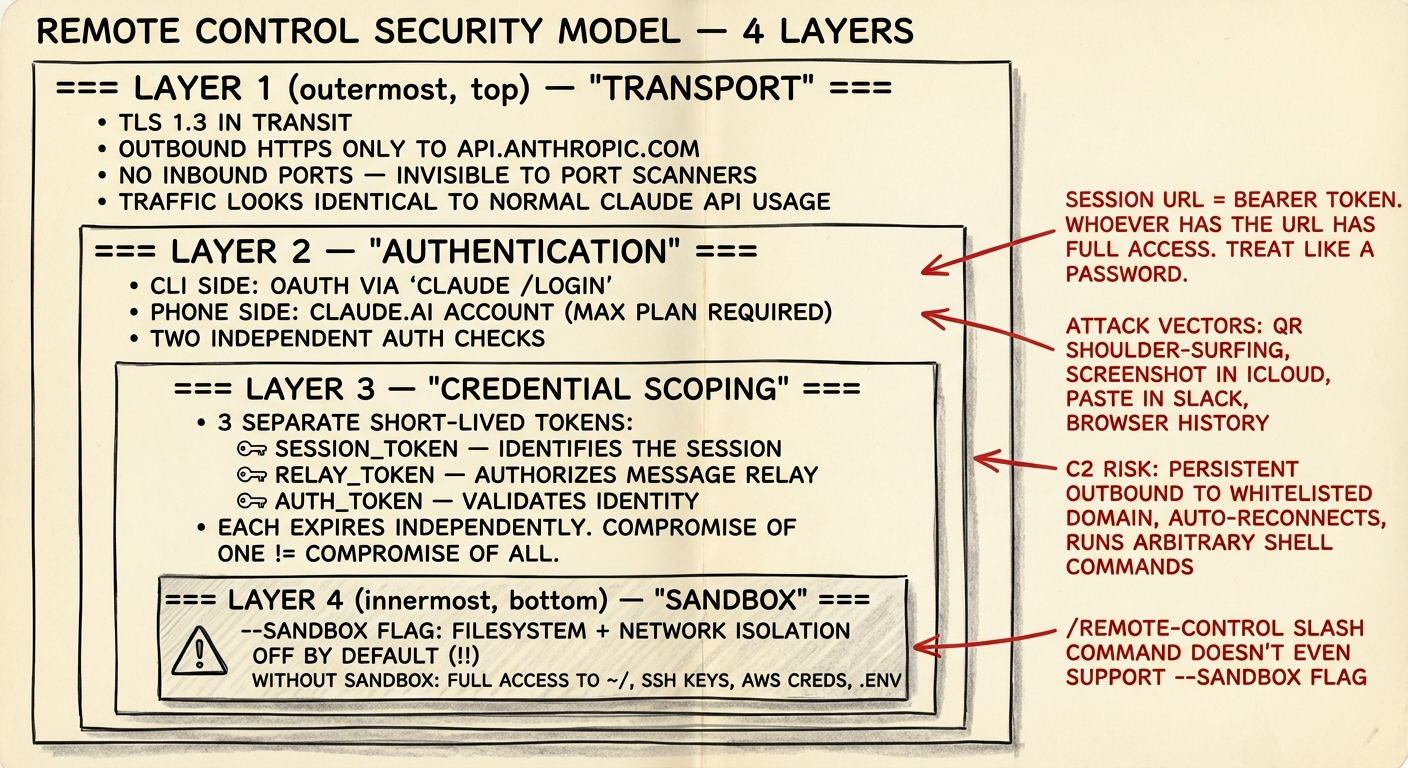
Four layers of defense. Three are solid. One is surprisingly weak.
Layer 1: Transport
TLS encryption. Outbound-only HTTPS to api.anthropic.com — same domain as regular Claude API calls. Implications:
- No special firewall rules needed
- Traffic blends with normal API usage (both good and bad)
- Corporate proxies that whitelist
api.anthropic.comautomatically allow remote control
Layer 2: Authentication
CLI side authenticates via claude /login (OAuth). Phone side requires a claude.ai Max plan login. Two independent checks.
Layer 3: Scoped Credentials
Multiple short-lived tokens, each for a single purpose:
session_token— identifies the sessionrelay_token— authorizes message relayauth_token— validates identity
Each expires independently. One compromised token doesn't compromise the rest.
Layer 4: The Session URL — Weakest Link
AgentSteer's security analysis found:
"The session URL itself functions as a master authentication token... the 'skeleton key' granting full access regardless of credential rotation policies."
Get the URL, operate the session. Attack paths:
- QR shoulder-surfing — someone at the coffee shop snaps a photo
- Screenshot leaks — you screenshot the QR to text it to yourself, it syncs to iCloud Photo Stream
- Browser history — the URL sits in your browsing history
- Slack paste — you share the URL with a coworker "for testing"
- Screen recording — someone records it during pair programming
The C2 Shadow
AgentSteer also flagged a structural concern:
persistent outbound connection → legitimate domain → auto-reconnect → arbitrary shell execution
If an attacker gets the session URL, they've got a C2-like channel: legitimate anthropic.com HTTPS, passes through firewalls, can run bash, access SSH keys and .env files, and auto-reconnects after network interruptions. Enterprise security teams should take note.
Sandbox
# Start with sandbox (restricted filesystem + network)
claude remote-control --sandbox

# Default: no sandbox
claude remote-control
Sandbox is off by default. When enabled, it restricts filesystem access to the project directory and limits network access. Most people won't know to turn it on. And if you start remote control from inside a session with /rc, the --sandbox flag isn't even available.
State Sync
When your phone joins a session that's already running, it needs the full conversation history. If the agent is mid-tool-call with partial output streaming, that's not trivial.
Based on how the Agent SDK's session management works (it supports --resume with full history reconstruction), the sync probably goes like this:
- Phone connects to the relay
- Relay sends the full conversation history accumulated so far
- If the agent is mid-execution, streaming events keep flowing to the newly connected client
- CLI holds the authoritative state; the remote UI is a view into it
It's an append-only log. The conversation is a sequence of events — user messages, assistant messages, tool calls, tool results. The relay stores this log. New clients get the full log on connect, then subscribe to new events.
Known sync problems:
- Stale state after reconnecting (showing conversations from hours ago)
- No incremental resync — when events are missed during a disconnect, there's no "give me events since sequence N" mechanism
- Client-side state can silently drift from the relay's state
The right fix is sequence numbers on every event. The client tracks "I've seen up to #47" and on reconnect asks for "everything after #47." That's how Slack and Discord handle it.
Latency
Hop count for a remote command:
Phone → Anthropic relay → CLI (local)
~50ms      ~10ms          ~0ms
              ↓
    CLI runs tool (e.g. git diff)
              ~200ms
              ↓
    CLI → Anthropic relay → Phone
    ~10ms      ~50ms
Total round-trip for a simple tool call: roughly 320ms. LLM inference adds another 1-30 seconds on top, which is where all the waiting actually happens.
The relay hop adds maybe 60-100ms. For a chat interface where users type a prompt and wait several seconds for an AI response, this is imperceptible. The system is latency-tolerant by design — it's not a remote desktop or a game server.
Comparison With Similar Systems
| Claude Code RC | VS Code Tunnels | Tailscale DERP | ngrok | |
|---|---|---|---|---|
| What's relayed | App messages | Network traffic | Network packets | TCP streams |
| Auth | Session URL + account | GitHub/MS account | WireGuard keys | Auth token |
| Encryption | TLS (claims E2E) | TLS | WireGuard (true E2E) | TLS |
| Reconnection | Auto < 10 min | Auto | Auto + direct upgrade | Configurable |
| Open source | No | Partially | Yes (DERP server) | No |
| Attack surface | Chat + tools only | Full network | Full network | Full network |
Claude Code has a smaller attack surface than tunnel-based approaches (structured messages only), but a weaker auth model than Tailscale (WireGuard key exchange) or VS Code (GitHub account + device binding).
What I'd Change
If I were designing Remote Control v2:
Device binding — tie the session URL to a device fingerprint. Scanning the QR triggers a challenge-response that includes phone device attestation (Apple DeviceCheck / Android SafetyNet). A leaked URL becomes useless on a different device.
Bidirectional heartbeat — the relay pushes connection health to all clients:
{"type": "heartbeat", "cli_last_seen": "2026-02-26T10:00:05Z", "latency_ms": 47}Event sequence numbers — every event gets a monotonically increasing sequence number. Clients track their position. On reconnect, they pick up where they left off. Eliminates stale state after app restart.
Sandbox by default — flip the default. claude remote-control sandboxes by default. People who need full access opt in with --no-sandbox.
Session TTL — configurable session lifetime. claude remote-control --ttl 2h means the session auto-expires after 2 hours regardless of connection status.
Try It
# Most common: start inside a running session
/rc

# Or start a fresh session from CLI
claude remote-control

# With sandbox (recommended for first try)
claude remote-control --sandbox

# With verbose logging (see the protocol details)
claude remote-control --verbose
Scan the QR with your phone, type something, watch your terminal execute it locally.
Things to test:
- Kill your laptop's wifi for 30 seconds, bring it back. Session still alive?
- Kill wifi for 11 minutes.
- Force-quit the Claude app on your phone and reopen. Conversation still there? (Probably not.)
- Open the session URL in two browser tabs at once.
- Send the session URL to a friend with a Max plan. Can they connect?
That's where the real engineering decisions are hiding.
Closing
Remote Control is a relay-based, outbound-only messaging bridge between your local CLI and a remote UI. Not a network tunnel. That one design choice shapes everything: the security model, the latency profile, the attack surface, the constraints.
The v1 is solid work. Scanning a QR code and landing in a working session is genuinely impressive. But the engineering seams are visible: one-way heartbeat, missing sequence numbers, no sandbox by default, session URL as skeleton key. All fixable.
If you're building agent infrastructure — not just using it, building it — study this design carefully. The relay pattern, scoped credentials, application-level message forwarding: these are the building blocks of production agent systems. And the failure modes — stale state, silent disconnection, URL-as-bearer-token — those are the exact bugs you'll ship in your own system if you don't think about them early.